 Wansview Cloud Docs
H6 クイックスタートガイド
Wansview H6 バッテリー式ビデオドアベルの製品図、セットアップ、チャイムのペアリング、設置、便利な機能、FAQ について説明します。
H6 クイックスタートガイド
本マニュアルをよくお読みいただき、いつでも参照できるように保管してください。
製品図
1. ドアベルカメラ
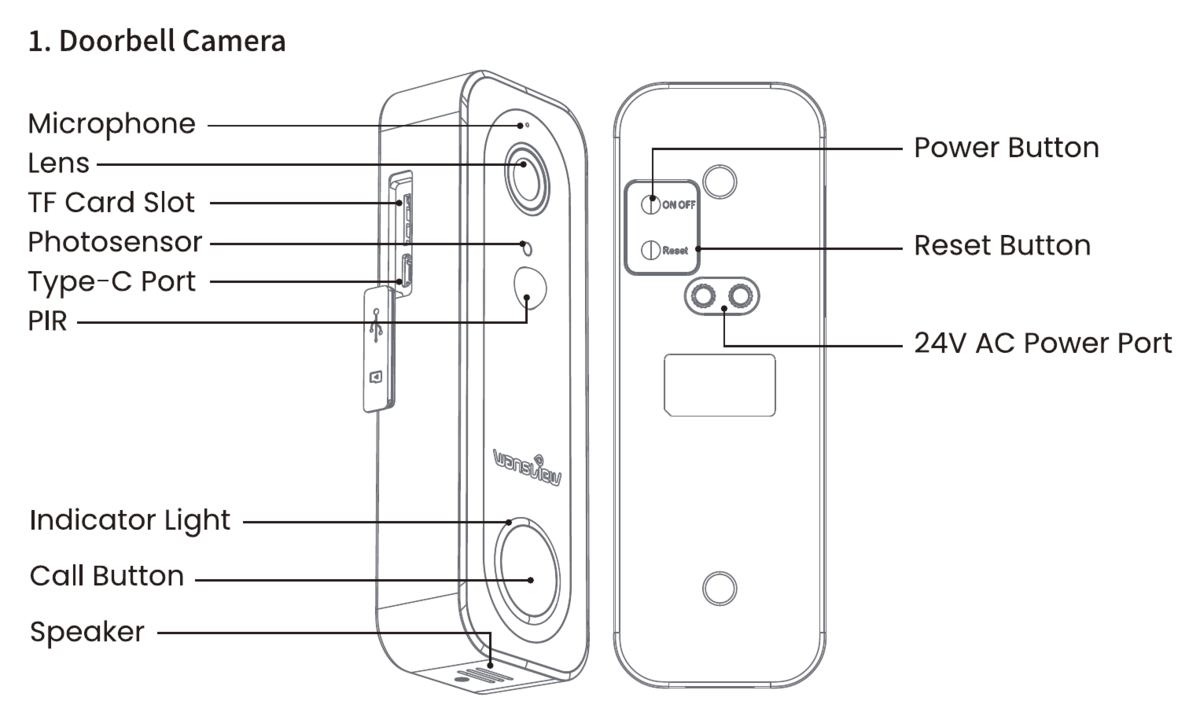
- マイク
- レンズ
- TF Card スロット
- 光センサー
- Type-C ポート
- PIR
- インジケーターライト
- 呼び出しボタン
- スピーカー
- 電源ボタン
- リセットボタン
- 24V AC 電源ポート
2. ドアベルチャイム
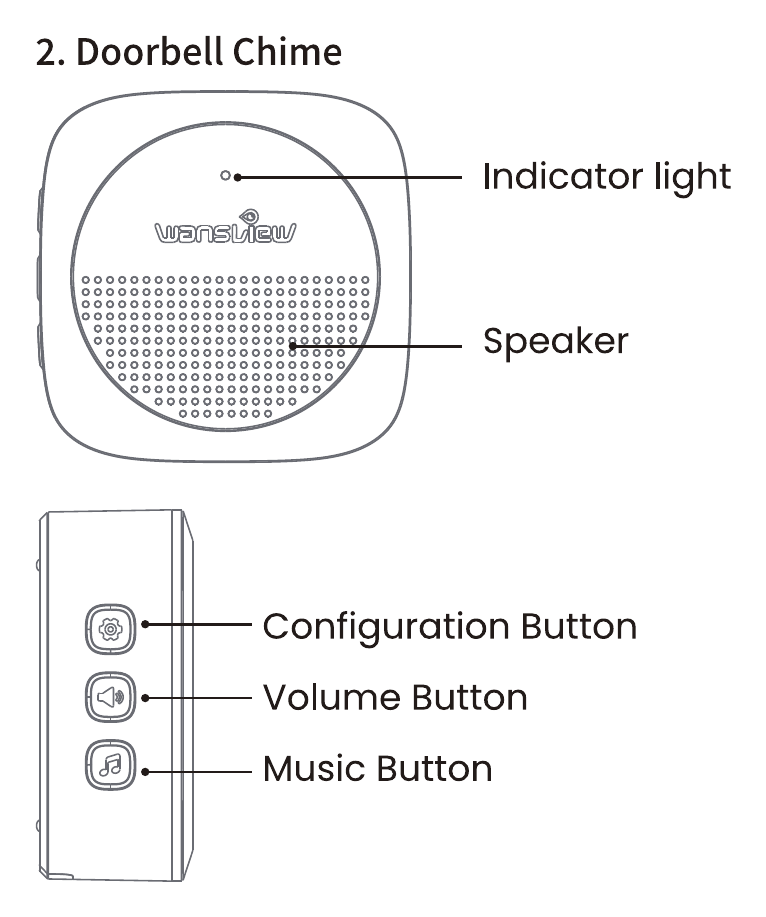
- インジケーターライト
- スピーカー
- 設定ボタン
- 音量ボタン
- 音楽ボタン
同梱物

- ドアベルカメラ
- 取り付けブラケット
- 位置合わせシール
- ネジ一式
- 電源コード
- 24V AC 電源ケーブル
- AAA 電池 × 3
- チャイム
セットアップ
「Wansview Cloud」アプリをダウンロードし、アカウントを作成してからログインします。
カメラが十分に充電されていることを確認します。起動音声ガイドが聞こえるまで、電源ボタンを約 5 秒間押します。次に、インジケーターライトが赤と青に交互に点滅するまで、リセットボタンを約 5 秒間押します。
「Wansview Cloud」アプリを開き、「+」または「デバイスを追加」ボタンをタップして、一覧から H6 カメラを見つけ、アプリ内の案内に従います。
インジケーターライトの状態
| ライトの状態 | カメラの状態 |
|---|---|
| 🔴 赤色点灯 | カメラの電源がオン |
| 🔴🔵 赤と青に点滅 | カメラが接続待機中 |
| 🔵 青色点滅 | Wi-Fi 接続中 |
| 🔵 青色点灯 | カメラが正常に動作中 |
| 🔴 赤色点滅 | リセット/ファームウェア更新中 |
チャイムへの接続
チャイムに使用可能な電池がセットされていることを確認します。
チャイムの設定ボタンを押します。インジケーターライトが点滅し、ペアリングモードに入ったことを示すトーン音が鳴ります。
30 秒以内に、ビデオドアベルの呼び出しボタンを押してペアリングを要求します。
ペアリングに成功すると、チャイムのインジケーターライトの点滅が止まり、音が鳴ります。
チャイムのボタン
| ボタン | 機能 |
|---|---|
| ⚙️ 設定ボタン | リセット/一度押すと設定モードに入ります |
| 🔊 音量ボタン | 押すたびに音量レベルを切り替えます |
| 🎵 音楽ボタン | 押すたびに音楽を切り替えます |
設置
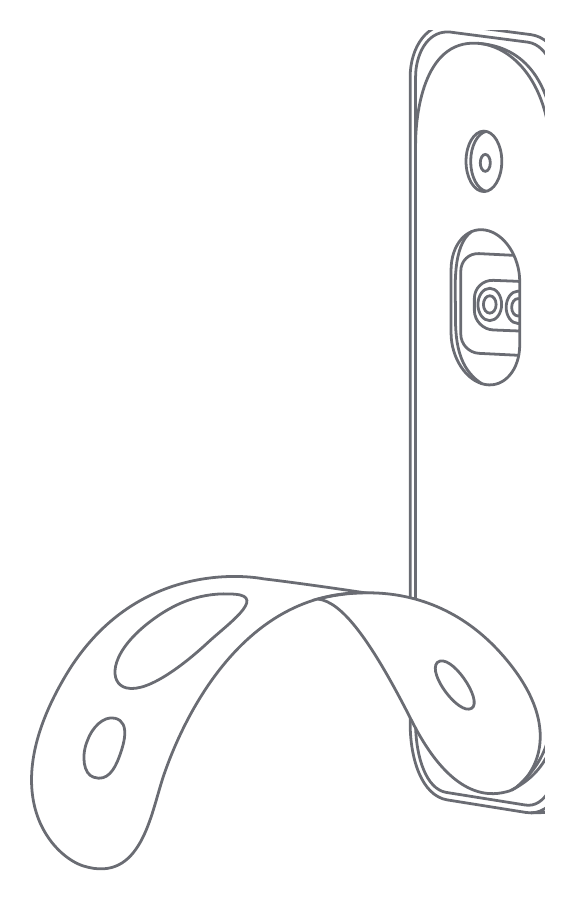
3M シールで設置する
ブラケット背面の 3M シールの裏紙をはがし、ブラケットを壁に貼り付けます。
ドアベルカメラを壁掛けブラケットに取り付け直します。
ネジで設置する
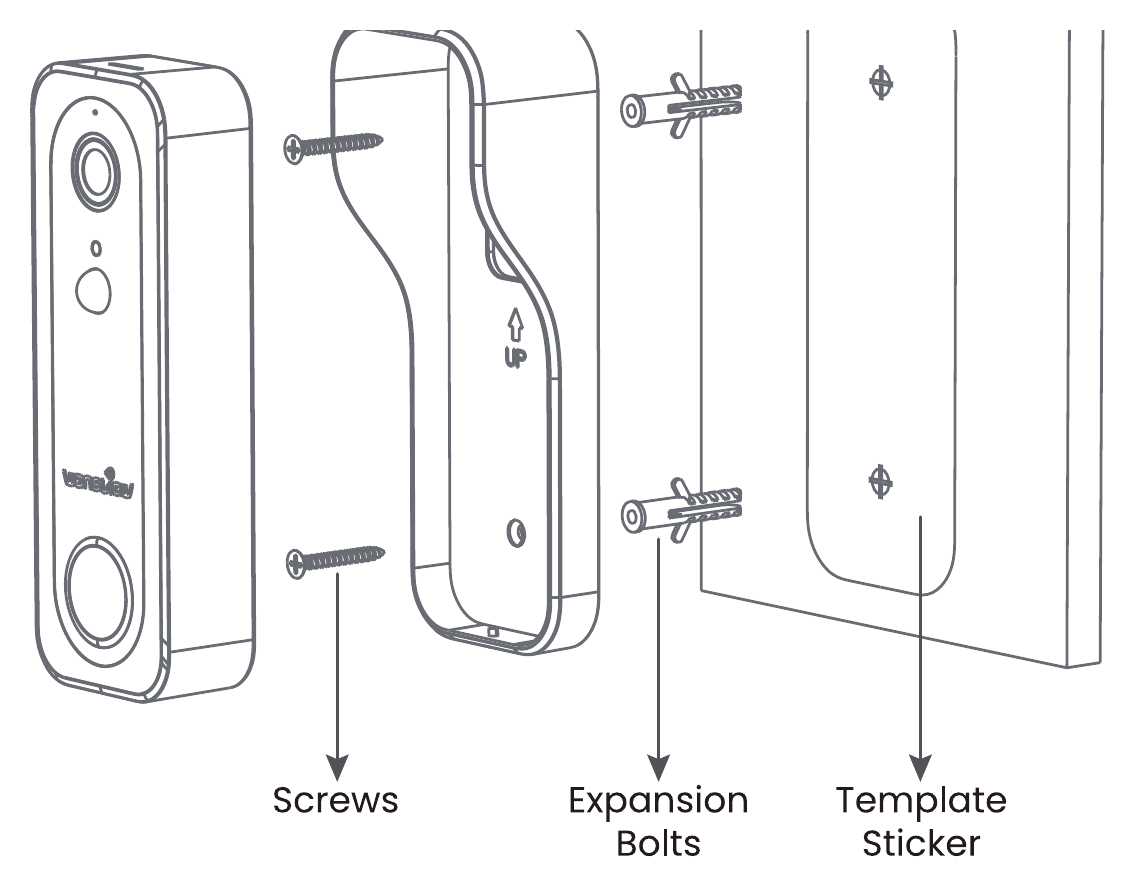
位置合わせシールを使って壁に 2 つの穴を開け、取り付けブラケットを壁にネジで固定します。
ドアベルカメラを壁掛けブラケットに取り付け直します。
便利な機能
- クラウドストレージ — クラウドストレージをオンにすると、緊急時の映像情報をクラウドサーバーに保存できます。データの損失や破損を防ぎます。クラウドストレージもあわせてご覧ください。
- 長持ちするバッテリー — 内蔵の 5200mAh リチウム電池により、1 回の充電で長時間ご使用いただけます。充電して繰り返し使えるため、省エネで環境にもやさしい設計です。
- 超高精細なナイトビジョン — 内蔵の 4 つの LED 赤外線ナイトビジョン素子が昼夜を自動で切り替え、暗い環境でもくっきりと確認できます。
- インテリジェント検知 — 人体検知と動体アラートに対応しています。
- 分解防止アラーム — 不正に分解されると、デバイスが自動でアラームを発し、同時にアプリへアラームメッセージを送信します。
- 不審な滞留通知 — ドア前 5 メートル以内の動きを 24 時間 365 日検知します。監視画面に変化があると自動的に記録され、同時にアラームメッセージがアプリへ送信されます。
FAQ
注意事項
ISED 声明
This device contains licence-exempt transmitter(s)/receiver(s) that comply with Innovation, Science and Economic Development Canada's licence-exempt RSS(s).
FCC 声明
Note: This equipment has been tested and found to comply with the limits for a Class B digital device, pursuant to part 15 of the FCC Rules. These limits are designed to provide reasonable protection against harmful interference in a residential installation. This equipment generates, uses and can radiate radio frequency energy and, if not installed and used in accordance with the instructions, may cause harmful interference to radio communications. However, there is no guarantee that interference will not occur in a particular installation. If this equipment does cause harmful interference to radio or television reception, which can be determined by turning the equipment off and on, the user is encouraged to try to correct the interference by one or more of the following measures:
- Reorient or relocate the receiving antenna.
- Increase the separation between the equipment and receiver.
- Connect the equipment into an outlet on a circuit different from that to which the receiver is connected.
- Consult the dealer or an experienced radio/TV technician for help.
Important: Change or modifications not expressly approved by the manufacturer responsible for compliance could void the user's authority to operate the equipment.
This device complies with part 15 of the FCC Rules. Operation is subject to the following two conditions: (1) this device may not cause harmful interference, and (2) this device must accept any interference received, including interference that may cause undesired operation.
EU 適合宣言(簡易版)
wansview は、本ドアベルカメラが Directive 2014/53/EU の必須要件およびその他の関連規定に適合していることを宣言します。適合宣言については https://wansview.com/ をご覧ください。
アフターサービス
- US / CA: [email protected]
- UK: [email protected]
- TK: [email protected]
- 電話: +1 323-686-3288
- 対応時間: 6:00 PM – 3:00 AM (PST)、月曜日から金曜日

Made in China.